Most Pocket Option traders open their first trade on a phone. The mobile app gives access to the same account, balance, assets and payouts as the web terminal, adds push notifications and works over mobile data. This guide explains how to download the pocketoption app on Android and iOS, what the mobile terminal looks like and how to keep trading disciplined when the platform is always in your pocket.
Which versions of the Pocket Option app exist
| Platform | How to get it | Notes |
|---|---|---|
| Android | Google Play or APK from the official website | Android 5.0+; the APK is the fallback where Play is not available |
| iOS (iPhone / iPad) | App Store | Search “Pocket Option Broker”; iOS 12+ |
| Mobile browser | Open pocketoption.com and log in | Full terminal without installing; works on any phone |
| Windows / macOS | Desktop app from the official website | Same account, larger charts |
How to download and install the app
- 1Android: open Google Play, search for Pocket Option and tap Install. If Play is unavailable in your region, log in to your account in the browser, open the “Apps” section and download the APK; allow installation from this source when prompted.
- 2iOS: open the App Store, search for Pocket Option and tap Get. Confirm with Face ID or your Apple ID.
- 3Open the app and log in with the same email and password as the website, or register a new account directly in the app.
- 4Allow notifications if you want alerts about closed trades, deposits and tournaments.
- 5Switch to the demo account from the balance menu to explore without risk.
The mobile terminal: what is where
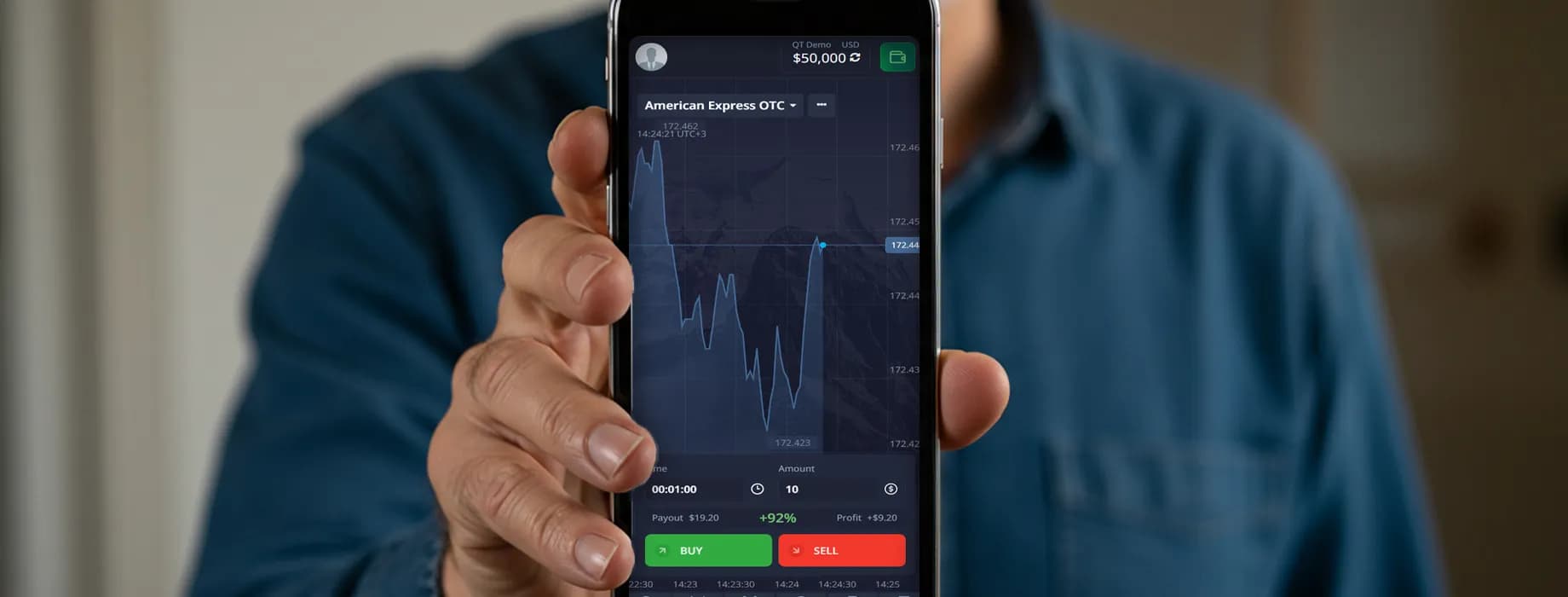
- Top bar — asset name with payout; tap it to open the asset list and search.
- Chart — pinch to zoom, swipe to scroll; tap the chart icon to switch candles/line and the timeframe.
- Indicators and drawing tools — the tools icon at the edge of the chart; the same set as on the web.
- Trade panel — expiration time, amount and the Up / Down buttons at the bottom of the screen.
- Menu — balance switch (demo / real), Finance (deposit, withdrawal, history), profile, support chat, tournaments and social trading.
Placing a trade from the phone
Choose the asset, set the expiration (3–5 minutes is a comfortable minimum on a small screen), enter the amount — minimum $1 — and tap Up or Down. The open trade appears on the chart with a countdown; the result is shown as soon as it closes. Everything happens on the same account as the web version, so a trade opened on the phone can be watched on the desktop and vice versa.
Deposits, withdrawals and verification in the app
The Finance section of the app offers the same payment methods as the website: cards, crypto, e-wallets and local methods, with the same $5 minimum deposit and $10 minimum withdrawal. Verification is often easier on the phone — you photograph your ID and proof of address with the camera and upload them directly from the Profile section. Withdrawals are requested and tracked in Finance → Transaction history exactly as on the web.
App vs web version: what is different
| Feature | Mobile app | Web terminal |
|---|---|---|
| Account, balance, assets, payouts | Same | Same |
| Indicators and drawing tools | Full set, smaller workspace | Full set, several charts at once |
| Push notifications | Yes | Browser notifications only |
| Biometric login | Face ID / fingerprint | Password + 2FA |
| Multiple charts on one screen | No | Yes |
| Data usage | Low, optimised for mobile | Higher |
Trading discipline on a small screen
- Keep the position size at 1–2% of the balance — the phone makes it easy to tap “+” a few times too many.
- Enable biometric login and 2FA, and never trade on public Wi-Fi without a VPN.
- Avoid 5-second trades on mobile; a delayed tap or a network hiccup matters more at that speed.
- Do not trade while walking or in transit. Notifications can tell you a trade closed; they should not tempt you to open the next one immediately.
- Use the same journal as on desktop — the trade history in the app is exportable to your notes.
Register on Pocket Option, download the app from your account and start with the free $50,000 demo on your phone.
Open Pocket Option account