Social trading is one of the features that made Pocket Option popular with beginners: instead of learning technical analysis first, you can look at what experienced traders are doing in real time and copy their trades on your own account. It sounds simple, and technically it is — but the results depend entirely on whom you copy and how much you allocate. This guide explains how pocketoption Social Trading works, how to read trader statistics, and how to set limits so that one bad leader cannot wipe out your balance.
What is Social Trading on Pocket Option?
Social Trading (often called copy trading) is a built-in section of the Pocket Option terminal that shows a live feed of trades made by other users and a ranking of the most successful traders. You can watch their entries, open the same trade manually with one click, or enable automatic copying: every time the chosen trader opens a position, the platform opens the same asset, direction and expiry on your account with the amount you defined.

- Live trade feed — see the assets, directions, amounts and results of recent trades across the platform.
- Trader ranking — sorted by profit, number of trades or copiers, with a profile page per trader.
- One-click copy — repeat a single trade manually while it is still open.
- Auto-copy — subscribe to a trader; their trades are mirrored automatically until you stop.
- Available on demo — you can test copying with virtual money.
Where to find it and how to start copying
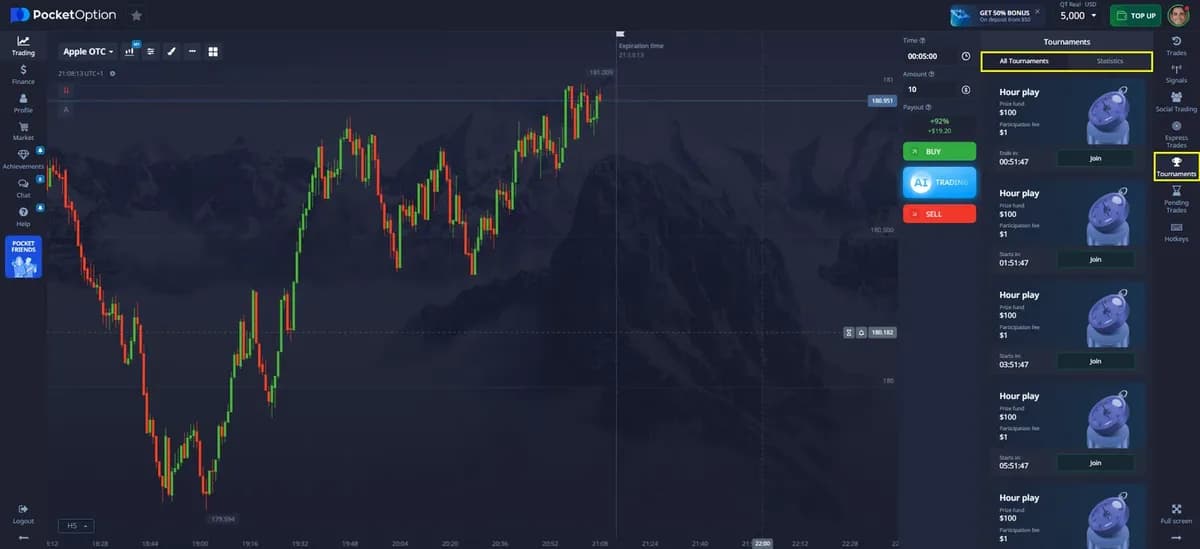
- 1Log in and open the trading terminal (demo or real).
- 2In the right sidebar click Social Trading (the icon with people).
- 3Browse the Top traders tab — open a profile to see the history, profit chart, favourite assets and number of copiers.
- 4Click Copy on the trader you selected.
- 5Set the copy parameters: amount per trade (fixed) or proportion of the leader’s trade, maximum number of simultaneous trades, and optionally a total loss limit.
- 6Confirm. Trades will appear in your Trades panel with a “copied” mark; you can stop copying at any time.
How to choose a trader to copy
| Metric | What to look for | Red flag |
|---|---|---|
| Trading history | At least 3 months and 300+ trades | A profile created last week with a 90% win rate |
| Profit curve | Steady upward line with small dips | Vertical jumps followed by long flat lines (one lucky streak) |
| Drawdown | Largest losing streak under 20–25% of balance | Several 50%+ drawdowns recovered with martingale |
| Trade size | Consistent amounts | Amounts doubling after each loss |
| Assets & expiry | A few assets they clearly specialise in, 1–5 minute expiries | Random assets, 5-second trades |
| Copiers | Growing number of copiers over time | Thousands of copiers gained in one day (promoted account) |
Diversify: copy 2–3 traders with different styles and assets rather than one “star”. If one has a losing week, the others may compensate. Review your copy list every weekend and remove traders whose behaviour changed (larger sizes, new assets, sudden losses).
The real risks of copy trading
- Leader risk — many top-ranked traders use martingale; they look great until one sequence wipes them out, and your copied trades with them.
- Timing risk — your trade opens a fraction of a second after theirs, sometimes at a slightly different price; on short expiries this can change the outcome.
- Payout difference — payouts vary by account status and moment; the leader may earn 92% while your copy pays 85%.
- Over-allocation — copying five traders at $10 each on a $100 balance means 50% of your money can be at risk simultaneously.
- Demo vs real — some leaders are ranked by demo results. Check the account type shown in the profile.
Recommended copy settings for a small balance
| Balance | Amount per copied trade | Max traders copied | Daily loss limit |
|---|---|---|---|
| $50 | $1 | 2 | $5 (10%) |
| $100–$200 | $1–$3 | 2–3 | 10% |
| $500+ | 1% of balance | 3–5 | 10% |
These are conservative figures based on the 1–2% risk rule used in our risk management guide. When the daily limit is hit, pause all copies for the rest of the day — a losing leader rarely recovers within hours.
Social trading vs signals vs manual trading
Signals tell you what to trade but leave the decision and sizing to you; social trading executes automatically; manual trading is fully yours. Beginners often combine them: copy 1–2 traders with a small fixed amount while learning to trade manually on the demo. Over time most successful users reduce copying and trade their own tested strategy.
Try Social Trading with virtual funds first: open a free demo account, copy two traders for a week and evaluate the results before any real deposit.
Open a free demo account